The Garmin GPSMAP 8600 series and the Lowrance HDS PRO are the two flagship-class multifunction displays most owners of 25- to 45-foot center consoles end up comparing, and the decision is rarely about screen size. It comes down to which sonar family, live-sonar system, network and chart ecosystem you want to live with for the next five to ten years. This guide compares both on the criteria that matter on the water and at the helm: sonar hardware, live sonar, charting, networking, power and wiring, and what each one demands from your installer.
Short answer: which MFD should you buy?
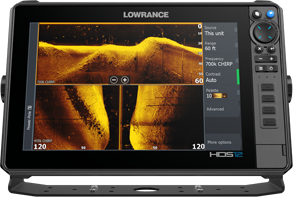
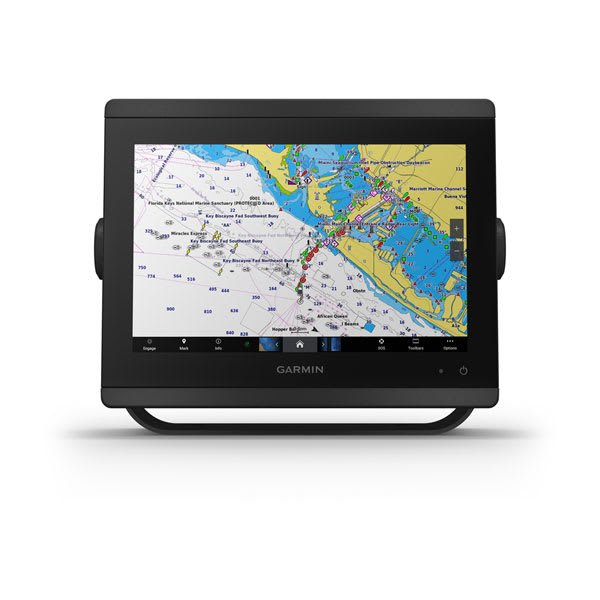
Buy the Garmin GPSMAP 8616xsv if your boat already runs, or will run, Garmin radar, a Reactor autopilot, a Force trolling motor or Garmin LiveScope, and you want one large networked helm display with built-in ClearVü/SideVü sonar and Garmin Navionics+ charting. Buy the Lowrance HDS PRO 12 if you fish structure and suspended fish daily, want ActiveTarget 2 live sonar tightly integrated with the sonar screen, and prefer a bright SolarMAX HD display. Both are excellent; the wrong choice is mixing ecosystems after the fact.
Garmin GPSMAP vs Lowrance HDS PRO: side-by-side comparison
| Factor | Garmin GPSMAP 8600 series | Lowrance HDS PRO |
|---|---|---|
| Typical sizes | 10, 12 and 16 inch | 9, 12 and 16 inch |
| Built-in sonar | CHIRP, ClearVü and SideVü (xsv models) | CHIRP plus Active Imaging (DownScan / SideScan) with 3-in-1 transducer |
| Live sonar | Garmin LiveScope family (LiveScope 2 HD connects directly to compatible MFDs) | Lowrance ActiveTarget 2 |
| Charts | Garmin Navionics+ (GN+), Quickdraw Contours, Auto Guidance+ | C-MAP and Navionics+ cards, Genesis Live community mapping |
| Network | Garmin Marine Network (Ethernet) plus NMEA 2000 | Ethernet plus NMEA 2000 |
| Trolling motor tie-in | Garmin Force | Minn Kota (Spot-Lock, Ulterra, Terrova) |
| Ecosystem strength | Radar, autopilot, cameras, audio all Garmin | Navico family (Lowrance, Simrad, B&G), Mercury VesselView |
| Best for | Offshore and mixed-use helm | Tournament and structure fishing |
Specifications vary by exact model and bundle, so always confirm the transducer, chart and network connectors listed on the product page before ordering.
Sonar performance: what the frequencies actually do
CHIRP sonar and cone angles
Both platforms use CHIRP, meaning the transducer sweeps through a range of frequencies in each pulse instead of pinging one frequency. The practical benefit is cleaner target separation and a stronger bottom return in deep water. Rules of thumb that hold across brands: a low CHIRP band around 40 to 75 kHz has a wide cone, often 35 degrees or more, and reaches deep water; a high CHIRP band around 150 to 240 kHz has a narrow cone, often around 10 to 20 degrees, and gives sharper detail at shallow to mid depths. A 1 kW CHIRP transducer used with both bands gives an offshore boat both depth penetration and fish detail.
Down imaging and side imaging
Garmin ClearVü and SideVü and Lowrance DownScan and SideScan Imaging all use high frequencies, typically in the 455 to 800 kHz range, to produce photo-like structure images. The tradeoff is range: at 800 kHz, expect usable imagery only in relatively shallow water, often under about 100 feet down, and in a narrow swath at the sides. At 455 kHz you gain range at the expense of detail. For offshore boats that fish 200 feet and deeper, imaging is a bonus, not the main event; CHIRP is.
Live sonar is the real tie-breaker
Forward-facing live sonar (Garmin LiveScope, Lowrance ActiveTarget 2, Humminbird MEGA Live) shows fish and bait moving in real time in front of the boat or below it. It is effectively brand-locked: LiveScope is built for Garmin displays and ActiveTarget 2 for Lowrance displays. If you plan to add live sonar within the next two seasons, decide the brand first and the display second. You can browse systems in our forward-facing live sonar collection, including the Garmin LiveScope 2 HD and the Lowrance ActiveTarget 2 system.
Installer Tip: Confirm live sonar compatibility against the exact display model, not just the brand. Older and newer units of the same family can need different adapters or software updates, and this is the most common reason a live sonar install stalls dockside.
Charts and navigation
For US waters, both platforms support detailed coastal charts derived from NOAA data, with added bathymetry. Garmin includes Garmin Navionics+ on GN+ models, along with Quickdraw Contours (personal depth contours recorded on your own boat) and Auto Guidance+. Lowrance supports C-MAP and Navionics+ chart cards, and its Genesis Live feature draws depth contours from your own sonar logs. Practically, Garmin’s strength is integrated navigation and autopilot routing; Lowrance’s strength is fast, on-the-water map making for anglers. Neither replaces up-to-date NOAA notices to mariners or a paper chart backup.
Networking: Ethernet and NMEA 2000 on both
A modern helm is a small network. The display is one node; radar, sonar modules, live sonar, a second MFD, cameras and engines are others. Two networks are involved:
- NMEA 2000 for sensors and engine data. Backbone up to 100 m (328 ft) with Mini-C cable, drop cables 6 m (20 ft) maximum, 120-ohm terminators at both ends, about 50 mA per Load Equivalency Number, 4 A maximum on the backbone.
- Ethernet for high-bandwidth devices: radar, sonar, chart sharing and video. Use sealed marine network cables and, with three or more devices, a marine network switch.
| Network item | Practical limit or rule | Installer note |
|---|---|---|
| NMEA 2000 backbone | 100 m (328 ft) with Mini-C | Inject power near the middle of the run |
| NMEA 2000 drop | 6 m (20 ft) maximum | Shorter is better; no daisy-chained drops |
| NMEA 2000 terminators | Two, 120 ohms each | Measure about 60 ohms CAN-H to CAN-L, power off |
| Ethernet | Marine cables in set lengths; Cat5e limit 100 m | Keep away from power wiring and VHF coax |
| Three or more Ethernet devices | Add a marine network switch | Star layout, label every cable |
Our guides on building a bulletproof NMEA 2000 network and connecting multiple displays with marine Ethernet cover both in detail.
Power, fusing and voltage drop for a 12- to 16-inch MFD
Large MFDs can draw several amps at full backlight and more when powering networked devices. As an illustration only (use your manual’s figures), a display drawing 5 A on a 12 V system should not lose more than about 0.36 V (3%) between the battery bus and the unit. The voltage drop formula is: Vdrop = 2 × run length (m) × current (A) × 0.0172 ÷ wire area (mm²).
| One-way run | Wire size | Voltage drop at 5 A | Percent of 12.8 V |
|---|---|---|---|
| 3 m (10 ft) | 2.5 mm² (14 AWG) | 0.21 V | 1.6% |
| 6 m (20 ft) | 2.5 mm² (14 AWG) | 0.41 V | 3.2% |
| 6 m (20 ft) | 4 mm² (12 AWG) | 0.26 V | 2.0% |
| 9 m (30 ft) | 4 mm² (12 AWG) | 0.39 V | 3.0% |
Use tinned marine-grade copper, adhesive-lined heat-shrink terminals and a fuse (or breaker) sized to the manual, installed as close to the power source as practical. A display that reboots when the trolling motor, windlass or radar transmits is a voltage-drop problem until proven otherwise.
Installer Tip: Bench-test the display on the dock before cutting the dash. Power it from a battery through your actual fused feed, confirm GPS lock, sonar power-up and network discovery, then measure voltage at the display terminals while the bilge pump and electronics run. A 5-minute bench test is far cheaper than recutting a fiberglass console.
Installation gotchas that cost people a weekend
- Cutout and flush-mount tolerance. Use the manufacturer’s template, not a previous unit’s cutout, and leave cooling clearance behind the unit.
- Transducer cable routing. Keep transducer cables at least 12 inches (30 cm) from engine ignition and high-current cables to avoid noise lines on the sonar screen.
- Connector sizes. Newer Garmin units use larger sealed network connectors; confirm you need the correct cable or adapter. Our Garmin Marine Network cable with large connectors is one example.
- Software updates. Update the MFD and any connected transducers before first use; mismatched firmware is a common cause of “device not found”.
- Glare and viewing angle. Check the display at the helm in real sun. Garmin and Lowrance both offer bright screens, but placement matters.
Which one fits your boat and fishing style?
Choose Garmin GPSMAP if you…
- run a center console or mixed-use boat with a large helm and want a big, clean display;
- plan to add Garmin radar, a Reactor autopilot or a Force trolling motor;
- value Garmin Navionics+ charting and Auto Guidance+ for coastal running.
Choose Lowrance HDS PRO if you…
- fish structure, schools and suspended fish and want ActiveTarget 2 live sonar;
- run a Minn Kota trolling motor and want tight Spot-Lock and navigation integration;
- want a bright, tournament-oriented sonar screen and quick custom map creation.
Ready to upgrade your helm?
Browse the fish finders and chartplotters collection to compare in-stock Garmin GPSMAP and Lowrance HDS PRO units, then add your transducer, network cables and mounting hardware in the same order so nothing arrives incompatible. If you want a second opinion on display, transducer and cable choice for your hull, contact our team for a rigging consultation and we will help you build a matched parts list.
Frequently asked questions
Is the Garmin GPSMAP 8600 series better than the Lowrance HDS PRO?
Neither is universally better. The GPSMAP suits boats that use the wider Garmin ecosystem (radar, autopilot, Force trolling motor, LiveScope) and large-format helm displays, while the HDS PRO suits anglers who want ActiveTarget 2 live sonar and bright SolarMAX HD sonar views.
Can I use Garmin LiveScope on a Lowrance HDS PRO?
No. Live sonar systems are designed for their own display families, so Garmin LiveScope is intended for compatible Garmin displays and Lowrance ActiveTarget 2 for compatible Lowrance displays. Check compatibility on the exact model before buying.
How much voltage drop is acceptable for a chartplotter?
Aim for no more than 3% voltage drop, about 0.36 V on a 12 V system. Use tinned marine copper, a fuse sized to the manual and short runs to avoid resets.
Do I need a marine network switch for two displays and radar?
With three or more Ethernet devices, add a marine network switch in a star layout. Two devices can often connect directly with a marine network cable, but check connector size and the manual.
Leave a Reply