Mid-tier touchscreen multifunction displays have become the sweet spot for most boats, and the Simrad NSX and the Raymarine Axiom 2 Pro are two of the best-known options. They look alike on a spec sheet but differ in sonar approach, ecosystem and how they behave on a mixed network. Choosing on screen size alone is how owners end up with a display that cannot talk to the radar, autopilot or sonar they already own. This guide compares the NSX and the Axiom 2 Pro on interface, sonar, charts, networking, power and installation, and explains which one fits which boat.
Short answer: which mid-tier MFD should you buy?
Choose the Raymarine Axiom 2 Pro if you want built-in CHIRP and RealVision 3D sonar, a Raymarine radar or Evolution autopilot, and a single-box fishing and navigation display. Choose the Simrad NSX if you already run Simrad or B&G sensors, radar or autopilot on the network, or want to build a Navico-based system with add-on sonar modules. If you are starting from scratch with no brand commitment, the deciding factor is usually the radar and autopilot you want.
Specs and features compared
| Feature | Simrad NSX | Raymarine Axiom 2 Pro |
|---|---|---|
| Interface | Touchscreen with Simrad software | Touchscreen with LightHouse OS |
| Sonar | Add-on modules or compatible transducers; capabilities vary by model | Built-in CHIRP and RealVision 3D on Pro models |
| Charts | C-MAP and Navionics support | Navionics and LightHouse charts support |
| Networking | Ethernet, NMEA 2000, Navico ecosystem | Ethernet, SeaTalkng / NMEA 2000, Raymarine ecosystem |
| Radar and autopilot | Simrad / Navico radars and autopilots | Raymarine radars and Evolution autopilots |
| Best for | Mixed-use boats with Simrad or B&G gear | Fishing and cruising with built-in sonar |
Models, sizes and features change, so confirm the exact capabilities on the product page for the model you pick.
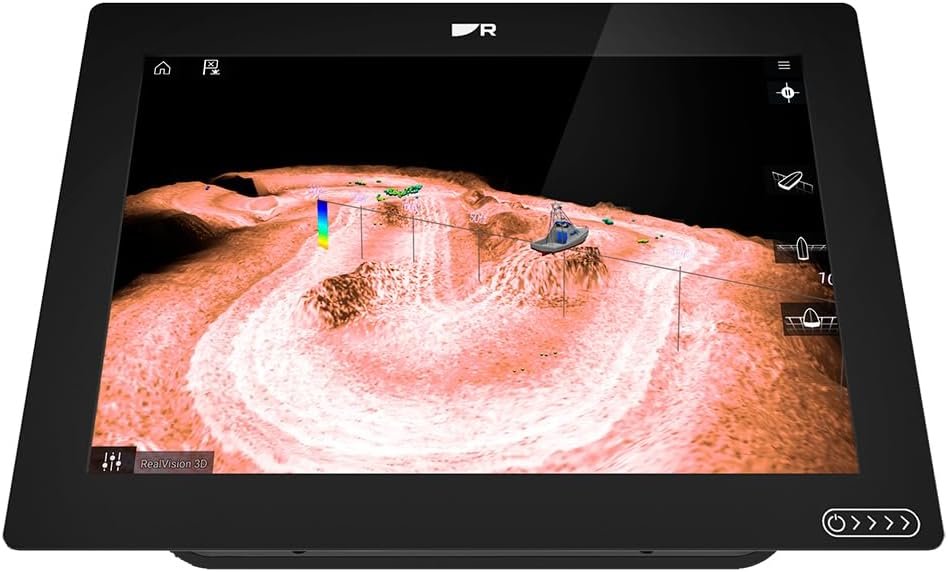
Sonar: built-in 3D or modular?
The Axiom 2 Pro family includes CHIRP and RealVision 3D, a scanning sonar that builds a three-dimensional picture of the bottom and fish around the boat when paired with the right transducer. Simrad’s approach is more modular: you choose a sonar module or transducer to match the application, which suits owners who want to tailor the system or already have sonar hardware. For anglers who want one box that does sonar and navigation out of the box, the Axiom 2 Pro is simpler. For owners building a larger Navico system with radar, autopilot and multiple displays, the NSX integrates naturally.
Transducer matching
Whichever you choose, the transducer must match the display’s sonar connector and power rating. A 1 kW CHIRP transducer with a low band is the usual offshore choice, while imaging transducers add detail. Our transducer selection guide covers mount type and frequency choices.
Charts, navigation and planning
Both displays offer autorouting, waypoints and routes, and both support chart cards or built-in cartography depending on the bundle. Check which chart is included for your region, how updates are delivered, and whether the chart licence is locked to the display. Neither replaces up-to-date NOAA notices and good seamanship.
Networking: what you must plan before you drill
Both displays connect to NMEA 2000 for engines, GPS, wind and autopilot, and to Ethernet for radar and sonar sharing. Keep to standard limits: NMEA 2000 backbone up to 100 m, drops up to 6 m, two 120-ohm terminators, about 50 mA per LEN and 4 A maximum on the backbone. See our NMEA 2000 guide for the 60-ohm test and a layout for a center console, and our marine Ethernet guide for switches and cable choice.
| Network task | Simrad NSX | Raymarine Axiom 2 Pro |
|---|---|---|
| Add a second display | Ethernet with a switch if needed | Ethernet with a switch if needed |
| Connect radar | Navico radar over Ethernet | Raymarine radar over Ethernet |
| Autopilot | NAC / Navico autopilot over NMEA 2000 or Ethernet | Evolution autopilot over SeaTalkng |
| Engines and sensors | NMEA 2000 | NMEA 2000 via SeaTalkng adapters |
Installer Tip: Mixing brands on one network is possible but takes planning. Check each device for NMEA 2000 compatibility, avoid proprietary connectors where an adapter will be needed, and test one device at a time when commissioning.
Power, wiring and installation
A 9- to 12-inch MFD typically draws a few amps; check the manual and use a fused feed sized accordingly. Aim for no more than 3% voltage drop (about 0.36 V on 12 V) with tinned marine wire. Vdrop = 2 × length (m) × current (A) × 0.0172 ÷ area (mm²). For example, 5 A over 6 m of 2.5 mm² wire drops about 0.41 V (3.2%), slightly too much, so use 4 mm² (about 0.26 V). See our voltage drop guide for gauge tables.
Mounting tips
- Use the manufacturer’s template and leave rear clearance for connectors and cooling.
- Test the display at the helm in direct sun before final mounting.
- Add drip loops and strain relief on every cable.
- Label each connector and keep a wiring diagram aboard.
Which should you buy?
Choose the Axiom 2 Pro if you…
- want built-in 3D sonar in a single box;
- plan to use Raymarine radar or an Evolution autopilot;
- prefer the LightHouse interface for navigation and fishing.
Choose the NSX if you…
- already have Simrad or B&G devices on the boat;
- want a modular, Navico-based system;
- plan to add multiple displays and Navico radar and autopilot.
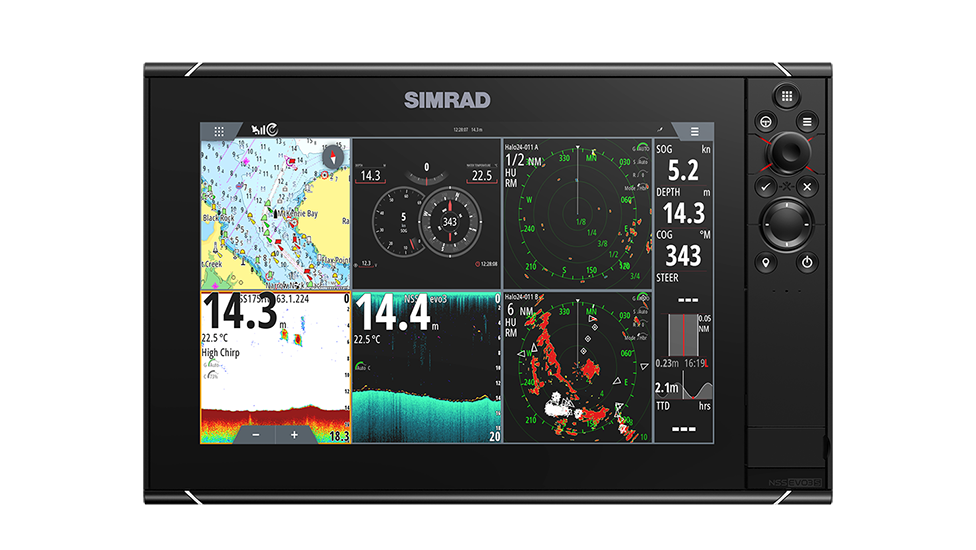
Shop displays and get fitment advice
Compare units in our fish finders and chartplotters collection, and see how larger displays compare in our Garmin GPSMAP vs Lowrance HDS PRO guide. Need advice on which suits your helm? Contact us.
Real-world use: how each unit behaves on the water
Spec sheets do not tell you how a display behaves at 3 am in a following sea. Three things matter in daily use: how fast the interface responds with sonar, radar and charts all running, how readable the screen is in direct sun with polarized glasses, and whether the controls work with wet or gloved hands.
| Daily-use factor | What to test | Why it matters |
|---|---|---|
| Touch response | Pan and zoom the chart with sonar running | Lag shows up when the processor is loaded |
| Sunlight readability | View at midday with polarized lenses | Some screens black out at certain angles |
| Wet-hand control | Use the touchscreen and keys when wet | Spray makes capacitive screens unreliable |
| Boot time and stability | Power cycle and watch for freezes | Matters after a voltage dip |
| Menu depth | Change a sonar setting in under three taps | You adjust settings constantly while fishing |
Total cost of ownership
The display price is only the start. Add the transducer, charts, network cables, any adapter cables, a mounting bracket or flush-mount kit, and installation. Bundles can save money, but check what is actually in the box: some include a transducer while others sell the head unit alone. If you plan to add radar or live sonar later, price those now to see whether the display’s network and processor can support them.
Upgrade path and resale
A display that shares data over a standard network and supports firmware updates holds its value and makes future upgrades easier. Choose a size you will not outgrow: moving from a 9-inch to a 12-inch display later often means re-cutting the dash. Check that the ecosystem you choose offers the sonar, radar and autopilot modules you might want in two or three years.
Installer Tip: Before you cut a dash, print the manufacturer cutout template at full scale and tape it in place. Sit at the helm and check sightlines, steering-wheel clearance and reach, then check that connectors and cables fit behind the panel.
Questions to ask before you commit
| Question | Why it matters |
|---|---|
| Which transducers work natively, and which need an adapter? | Adapters add cost and sometimes limit features |
| Does the display support the radar, autopilot and audio I plan to add? | Avoids a second purchase when you expand |
| What is the warranty, and who repairs it in my region? | Service availability is part of the real price |
| Can I update charts and firmware without a laptop? | Wi-Fi updates are convenient and reduce downtime |
| What data and screen layouts can I save? | Saved layouts speed up switching between fishing and cruising |
Both ecosystems are capable. The better choice is the one that matches the sonar, radar and autopilot you already own or plan to buy, and that has a dealer near you who can support it.
Frequently asked questions
Is the Simrad NSX better than the Raymarine Axiom 2 Pro?
Neither is better overall. The Axiom 2 Pro has built-in CHIRP and RealVision 3D sonar and suits Raymarine ecosystems, while the NSX suits boats with Simrad or B&G equipment and a modular Navico network.
Can I connect other brands to these displays?
Many NMEA 2000 devices work across brands, but radar, autopilot and sonar modules are usually brand-specific. Check compatibility on the exact models before buying.
What size touchscreen MFD should I choose?
A 9-inch display suits most 20 to 28 foot boats and a 12-inch display suits larger boats with room on the console. Check split-screen needs for sonar and radar.
How much voltage drop is acceptable for an MFD?
Keep drop under 3%, about 0.36 V on a 12 V system, by using tinned marine wire sized for the run and a fuse per the manual.
Leave a Reply